BIOS Boot


|
|
|
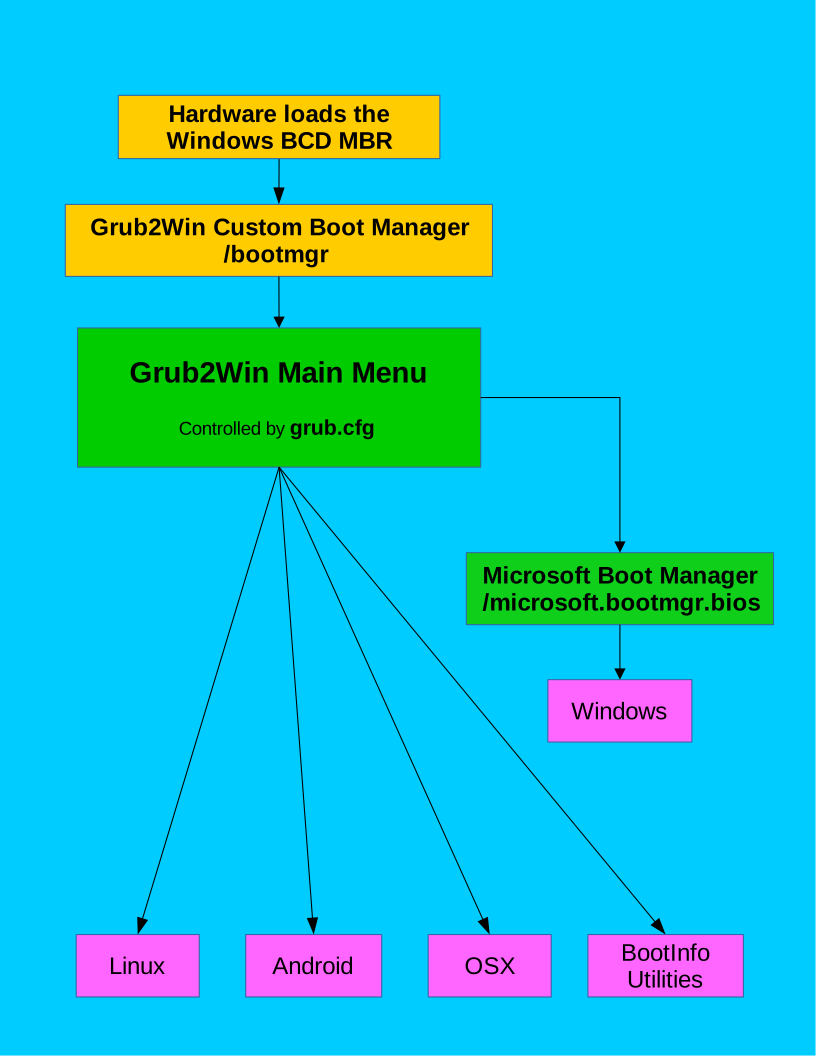
BIOS BCD Mode For Non XP Windows Versions Running On BIOS Firmware Systems The Windows MBR loads the customized Grub2Win Boot Manager module /bootmgr This module resides on either your C: drive or your "System Reserved" partition. The exact location depends on the disk configuration when Windows was installed to your machine. The Grub2Win Boot Manager module then takes control and performs the following actions: Searches all disk drives for file /grub2/g2bootmgr/gnugrub.functions.cfg to find the partition where the Grub2Win base directory is installed. This is usually the Windows boot partition C: drive. Sets variable $grub2part to the address of the partition where Grub2Win is installed. Usually (hd0, msdos1). Sets variable $prefix which usually has a value of (hd0, msdos1)/grub2 The $prefix variable is required by grub2 to locate its base directory and files. If $prefix is not set properly, grub2 initializes in rescue mode (limited command line). Loads several other GNU Grub modules to support various partition and filesystem types as well as USB drives and keyboards. Reads file $prefix/grub.cfg and builds the grub2 boot menu display. This is usually file C:\grub2\grub.cfg If you select Linux or another non-Windows operating system, Grub2Win loads the appropriate bootloader. If you select Windows, Grub2Win loads the Microsoft Windows Boot Manager module. The module name is /microsoft.bootmgr.bios The Microsoft Windows Boot Manager now takes control and loads Windows. |
|
Created with the Personal Edition of HelpNDoc: Maximize Your Reach: Convert Your Word Document to an ePub or Kindle eBook