Diagnostics


Diagnostics
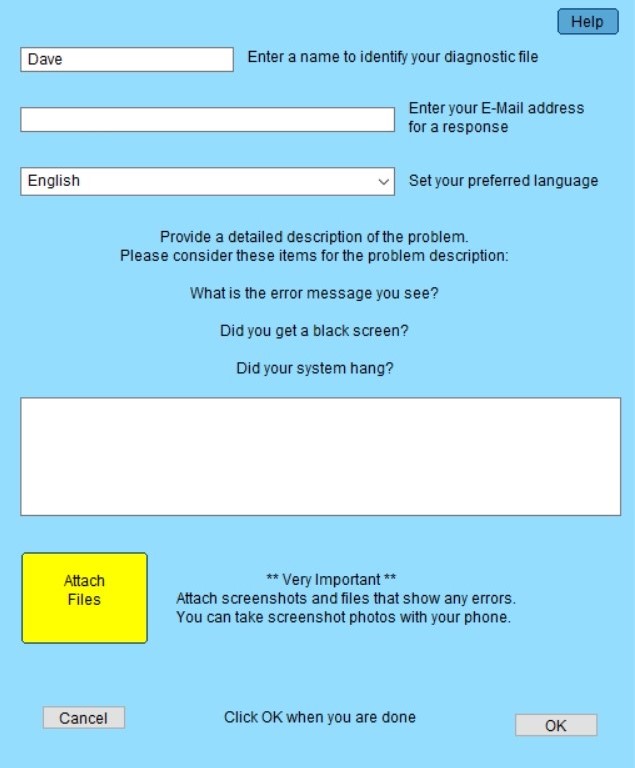
Enter a name to identify your diagnostics file
Your current user name will be filled in. You can change the name if desired.
Enter your E-Mail address for a response
Your default e-mail address will be filled in. You can change it if desired.
Set your preferred language
Use the pulldown to select the language you would like to use for communications.
I will use Google Translate to communicate with you in your preferred language.
Please provide a detailed description of the problem.
Provide a full description of the problem. Be specific.
Short descriptions like "It doesn't work" are not helpful.
Please provide as much detail as possible so that I can fully understand your issue.
Attach Files
When you click this button, you be able to browse files that you would like to attach to the diagnostics.
Screenshots of any errors you see can be very helpful.
You can take screenshot photos with your phone if needed.
OK
When you click this button, the diagnostics file C:\grub2\diagnose.7z will be generated and compressed.
This process can take as much as two minutes to complete.
You will then be given a choice:
Upload the diagnostic file to the Grub2Win support server
or
Email the diagnostic file to me.
Just attach the C:\grub2\diagnose.7z file to the email.
The support email address is drummerdp@users.sourceforge.net
Note: Grub2Win uses FTP to upload diagnostic files to the support server.
Your firewall software must be set to allow FTP port 21 traffic from grub2win.exe
Diagnostic items collected include the Grub2Win logs, partition lists, configuration files and BCD listings.
Created with the Personal Edition of HelpNDoc: Easily create Help documents